
See Schoolites in Action — Book Your Free Live Demo
A 30-minute personalised walkthrough of Schoolites school management software. See all features live, ask your questions, and get answers. No commitment, no credit card.
What You Will See in the Demo
Our demo is not a slideshow. You see the actual software running with sample school data. Here is what we cover:
Dashboard & Overview (5 minutes)
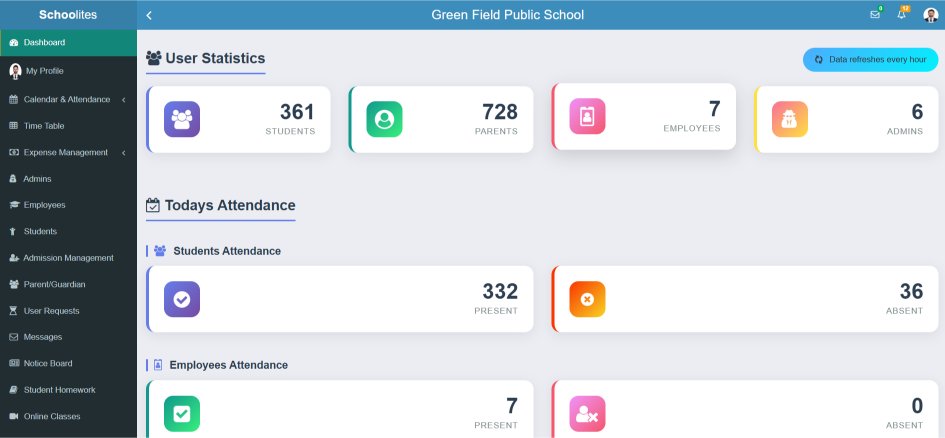
The first thing you see is the dashboard — a bird's-eye view of your school. Today's attendance count, fee collection status, pending tasks, new admission inquiries. We show how the principal's view differs from the teacher's view and the accountant's view.
Fee Management (8 minutes)
This is the most-requested demo topic. We show you: fee structure setup (tuition, transport, exam, activity fees), student fee tracking, receipt generation, online payment via UPI, fee defaulter reports, and automatic reminders. We use a sample fee structure similar to your school's.
Attendance & Parent Notifications (5 minutes)
Watch how a teacher marks attendance in 30 seconds on their phone. See the instant notification that goes to a parent's app. Check the attendance report that the principal sees in real-time.
Exams, Results & Report Cards (5 minutes)
See how marks are entered, grades are auto-calculated (CBSE or ICSE grading), and report cards are generated — all in your school's format with your school logo.
Mobile Apps (5 minutes)
We show you the admin app, teacher app, and parent app. See what your school name looks like on the white-label app. Understand how parents will interact with your school through the app.
Your Questions (5+ minutes)
The best part. Bring every question, every concern, every "but what about…" — we answer them live with the software.
What Happens After the Demo
After the demo, you will receive:
What you will NOT receive: daily sales calls, spam emails, or any pressure to buy. We send one follow-up email. After that, the ball is entirely in your court.
Schools That Typically Book a Demo
Based on our last 500 demo bookings, here is who typically reaches out:
- Schools exploring software for the first time — currently using paper registers and Excel
- Schools unhappy with current software — slow, outdated, poor support, expensive
- Schools about to open a new branch — need a scalable system for multiple locations
- Schools preparing for CBSE/board affiliation — need digital record keeping for compliance
- Schools that want a parent mobile app — competitors have one, they do not
Book Your Demo
What Makes Our Demo Different
Not a generic video — a personalised, interactive walkthrough of the actual software
Personalised Walkthrough
Not a generic pre-recorded video. A product expert tailors the demo to your school's specific needs — small school, big school, CBSE, ICSE, state board.
30 Minutes, That's It
We respect your time. The demo is focused and efficient — 30 minutes covering the features that matter most to your school. No filler, no fluff.
Live System Access
See the actual software with real sample data — not PowerPoint slides. Watch how attendance is marked, fees are collected, and reports are generated.
Ask Your Questions
The demo is interactive. Bring your specific questions and concerns. "Can it handle multi-branch?" "Does it work with our fee structure?" Get answers on the spot.
See the Mobile App
We show you the admin app, teacher app, and parent app — how they look, how they work, and what your school name looks like on the white-label app.
Zero Obligation
No credit card needed. No commitment. No pushy sales follow-up. Book the demo, learn about the software, and decide at your own pace.
How to Get Your Demo
Book a Time Slot
Click the button above, fill in your details, and choose a convenient date and time. We will confirm within 2 hours.
Join the Live Call
We will send a Google Meet / Zoom link. Join from your phone or laptop. Bring your questions and team members.
Start Your Free Trial
After the demo, start a 14-day free trial with full access. Add your real data and test everything.
Demo FAQs
Expert answers to the most common questions on this topic
Click the "Book Free Demo" button on this page. Fill in your name, school name, phone number, and preferred date/time. Our team will confirm the demo within 2 hours. You can also call us directly or WhatsApp us to book. The demo happens over Google Meet or Zoom — we will send you the link.
Typically 30 minutes. This is enough to cover all major modules (fees, attendance, exams, parent app) with a live walkthrough. If you have specific questions or want to see additional features, we can extend to 45 minutes. We will not take more time than you have.
Yes, completely free. No credit card required. No hidden charges. No payment information collected. The demo is purely educational — we show you the software and answer your questions. Even if you decide not to proceed, the demo itself is useful for understanding what school software can do.
Yes, we encourage it. Having the principal, admin head, and one senior teacher on the same call helps everyone understand the system. We can address different roles' concerns in one session. The more decision-makers on the call, the faster your evaluation process.
Nothing specific is required. But it helps if you have a rough idea of: your school's student strength, which board you follow (CBSE/ICSE/State), your biggest operational pain points (usually fees or attendance), and any specific features you want to see. This helps us personalise the demo.
We show you the product. If you ask about pricing, we explain our plans. But there is no high-pressure sales pitch, no "limited time offer," and no follow-up bombardment. We typically send one email after the demo with a summary and pricing. After that, it is your decision on your timeline.
Yes. After the demo, we offer a 14-day free trial with full access to all features. You can add your real school data and test everything. No credit card required for the trial either.
Ready to See It in Action?
Book a free 30-minute demo. See all features live. Ask your questions. No commitment.