

Student Data in UDISE+
Student data is the most critical component of UDISE+. It includes enrollment numbers, demographic details, social category distribution, and individual student profiles with PEN (Permanent Education Number).
Student Data Categories
1. Enrollment Data
Enter total student count by:
- Class-wise: Pre-primary to Class 12
- Gender-wise: Boys and Girls separately
- Section-wise: If multiple sections exist
2. Category-wise Distribution
Social category breakdown:
- General: General category students
- SC: Scheduled Caste
- ST: Scheduled Tribe
- OBC: Other Backward Classes
- Muslim/Minority: Minority community students
3. Special Categories
- CWSN: Children With Special Needs
- BPL: Below Poverty Line students
- Migrant: Children of migrant workers
- Out of School: Previously out of school children
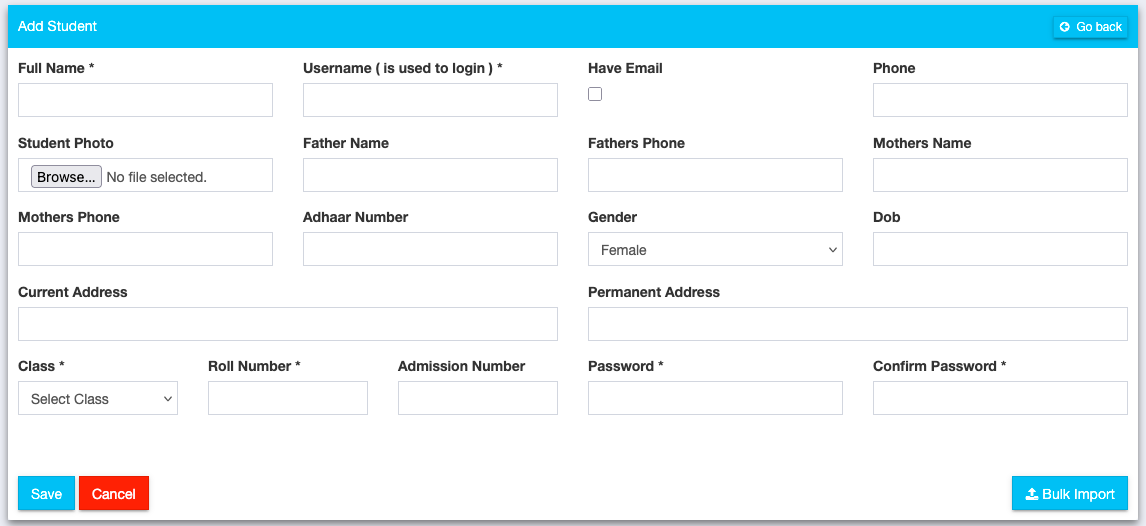
Adding individual student record in UDISE+
🚀 Skip the Data Entry Hassle
With Schoolites, your student and teacher data is always UDISE-ready. One click export, zero manual entry.
How to Enter Student Data
Navigate to Student Section
Login to UDISE+ and go to Data Entry → Student Information.
Select Academic Year & Class
Choose the current academic year and select the class for data entry.
Enter Aggregate Data
Enter total student counts by gender and category. Ensure totals match your school records.
Add Individual Students (if required)
For student-level data, enter each student's details including name, DOB, Aadhaar, and PEN.
Required Fields
| Field | Required | Notes |
|---|---|---|
| Student Name | Yes | As per birth certificate |
| Date of Birth | Yes | DD/MM/YYYY format |
| Gender | Yes | Male/Female/Other |
| Social Category | Yes | SC/ST/OBC/General |
| Aadhaar Number | Recommended | 12-digit Aadhaar |
| Father's Name | Yes | Full name |
Frequently Asked Questions
PEN (Permanent Education Number) is a unique ID assigned to each student. It helps track students across schools and years. If a student transfers, their PEN follows them.
Aadhaar is highly recommended but not mandatory. However, linking Aadhaar helps in tracking students and avoids duplicate entries.
Use the Student Transfer module. Enter the transfer date and the receiving school's UDISE code. The student record will be transferred automatically.
Tired of Manual UDISE+ Data Entry?
Let Schoolites handle the complexity. Export UDISE-ready data in one click, reduce errors by 99%, and never miss a deadline again.
Try Schoolites Free