

Table of Contents
UDISE+ Data Entry Overview
UDISE+ data entry is the process of entering your school's educational data into the government portal. This includes information about students, teachers, infrastructure, and academics. The data collection typically happens annually from September to January.
Data Categories in UDISE+
UDISE+ collects data in these main categories:
Step-by-Step Data Entry Process
Login to UDISE+ Portal
Visit udiseplus.gov.in and login with your UDISE code and password. Navigate to the Data Entry section from the dashboard.
Update School Profile
Start with the School Profile section. Verify basic details like school name, address, management type, and recognition status. Update if changed.
Enter Student Data
Enter student enrollment data class-wise. Include gender, social category (SC/ST/OBC), religion, and special needs information.
Enter Teacher Data
Add teacher information - qualifications, training completed, subjects taught, and professional details.
Enter Infrastructure Data
Update infrastructure details - buildings, classrooms, laboratories, facilities, and equipment.
Review & Submit
Review all entered data for accuracy. Check validation errors if any. Submit for BEO verification.
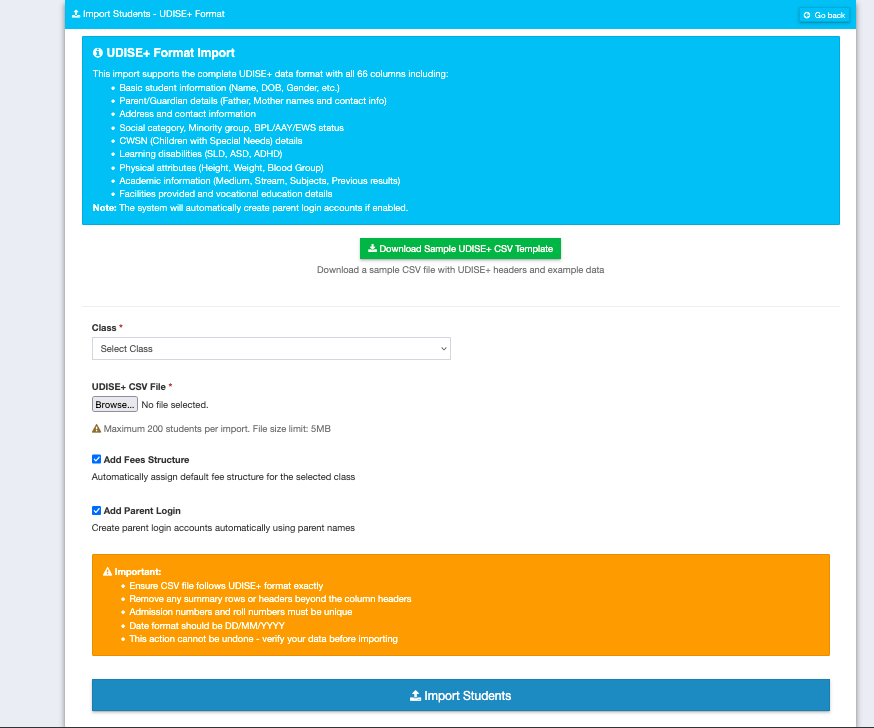
UDISE+ Data Entry Interface
🚀 Skip the Data Entry Hassle
With Schoolites, your student and teacher data is always UDISE-ready. One click export, zero manual entry.
Data Entry Tips
- Prepare data offline first: Use Excel templates to organize data before entering online
- Save frequently: Click Save after completing each section to avoid data loss
- Use off-peak hours: Access portal early morning (6-8 AM) for faster performance
- Check validation errors: Address all errors before submission
- Cross-verify numbers: Ensure totals match school records
Bulk Data Upload
For schools with large data volumes, UDISE+ supports bulk upload using:
- DCF (Data Collection Format) - Standard format for bulk student data
- Excel Templates - Download, fill, and upload Excel files

Bulk data upload feature in UDISE+
Frequently Asked Questions
For a typical school, complete data entry takes 3-5 hours. Large schools may need more time. Using Schoolites can reduce this to minutes by auto-generating UDISE-ready data.
Yes. Click "Save" after each section. Your data is saved and you can login later to continue from where you left off.
You can edit data until submission. After submission and before verification, contact BEO for corrections. After verification, contact DEO for major corrections.
The basic structure is same, but some fields may vary based on school type (primary, secondary, higher secondary) and management (government, private).
Detailed Data Entry Guides
Skip Hours of Manual Data Entry
Schoolites exports your school data in UDISE-ready format. One-click export, validated data, zero errors.
Data Entry Sections
Templates

🚀 Skip the Data Entry Hassle
With Schoolites, your student and teacher data is always UDISE-ready. One click export, zero manual entry.
Automate Now
Trusted by 1000+ schools