
Complete UDISE+ Compliance Made Simple
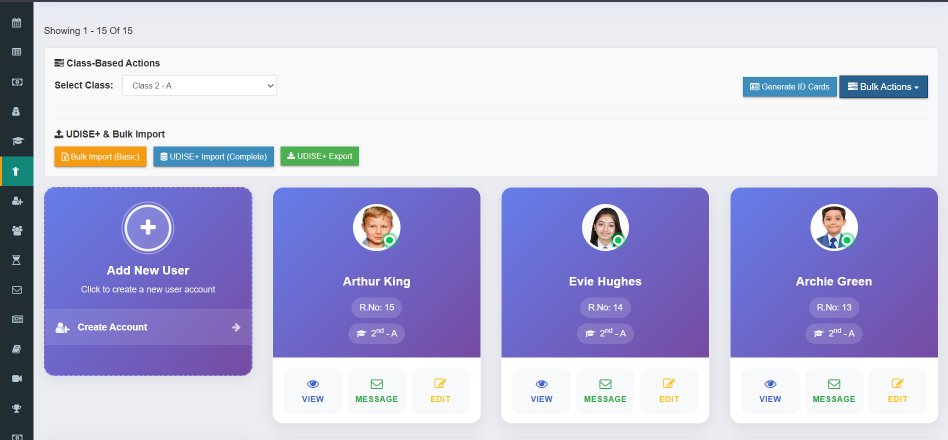
Stop struggling with manual data entry. Import student data with just 5 minimum fields and export in perfect UDISE+ format. Automated validation ensures error-free government submissions.
What is UDISE+ Portal?
Unified District Information System for Education Plus
UDISE+ (Unified District Information System for Education Plus) is an upgraded version of UDISE, the largest Management Information System for schools in India. It is managed by the Ministry of Education, Government of India and collects comprehensive data about schools, students, teachers, and infrastructure.
Annual Submission
Data collection happens every year between September-November
Mandatory for All Schools
Required for government, aided, and private schools
Comprehensive Data
Student enrollment, teachers, infrastructure, facilities & more
Complete UDISE+ Data Management
Everything you need for hassle-free UDISE+ compliance
Simple Student Import
Import student data with minimum required fields. No complex mapping needed.
- Only 5 minimum fields required
- Excel/CSV file support
- Auto-map columns
- Duplicate detection
- Download import template
Minimum Fields:
- Student Name
- Father's Name
- Date of Birth
- Gender
- Class
UDISE+ Format Export
Export student data in exact UDISE+ portal format for direct upload.
- 100% format compliance
- Pre-validated data
- Category-wise export
- Ready for portal upload
- DCF format support
Automated Validation
Catch and fix errors before submission with intelligent validation.
- Field-level validation
- Missing data alerts
- Format verification
- Age-class validation
- Detailed error report
Category-wise Reports
Generate UDISE+ required category reports automatically.
- Social category (SC/ST/OBC/General)
- Gender-wise enrollment
- Religion-wise data
- Age-wise distribution
- Special category students
Bulk Data Operations
Handle large amounts of student data efficiently.
- Import 1000+ students at once
- Bulk update fields
- Mass data correction
- Class-wise export
- Section-wise filtering
Historical Records
Maintain year-wise UDISE+ submission history.
- Year-wise snapshots
- Previous submissions
- Comparison reports
- Growth analytics
- Audit trail
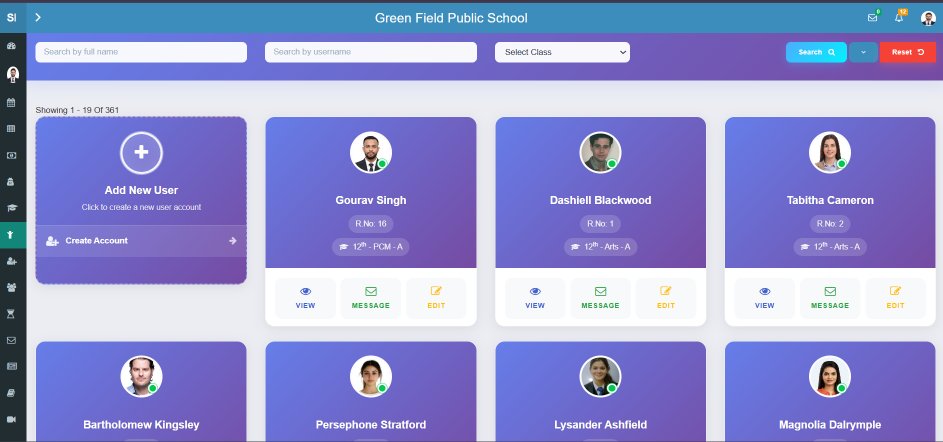
Powerful Student Data Dashboard
Manage all UDISE+ related data from one intuitive interface
Smart Filters
Filter by class, category, gender
Error Indicators
Spot missing data instantly
Validation Status
Track compliance readiness
One-Click Export
Generate UDISE+ file instantly
Import Students in 3 Easy Steps
Get started with minimum data - add more details later
Download Template
Get our Excel template with just 5 required columns: Name, Father's Name, DOB, Gender, Class
Fill Student Data
Copy-paste your existing data or enter manually. Optional fields can be added later.
Upload & Done!
Upload the file, review the preview, and import. Students are added instantly!
Pro Tip: Start with minimum fields to quickly set up your database. You can always add Aadhar, Category, Religion, and other UDISE+ fields later through the student profile or bulk update feature.
All UDISE+ Required Fields Supported
Capture every data point required by the UDISE+ portal
Personal Details
- Student Name
- Father's/Mother's Name
- Date of Birth
- Gender
- Aadhar Number
- Blood Group
Social Category
- Caste Category (SC/ST/OBC/Gen)
- Religion
- Minority Status
- BPL/APL Status
- EWS Status
- Orphan Status
Academic Details
- Class/Grade
- Section
- Admission Number
- Roll Number
- Stream (for Higher Sec.)
- Previous School
Special Categories
- CWSN (Disabled)
- Type of Disability
- Free Uniform Received
- Free Textbooks Received
- MDM Beneficiary
- Scholarship Status
Export to UDISE+ Format Instantly
Generate perfectly formatted export files that can be directly uploaded to the UDISE+ portal. No manual reformatting required.
Excel Format
Download in .xlsx format matching UDISE+ template exactly
Pre-Validated Data
All records checked for completeness before export
Selective Export
Export by class, section, category or all students
Error Report
Get list of students with incomplete data before export
Why Schools Choose Schoolites for UDISE+ Compliance
Save time, reduce errors, and ensure compliance
Save 10+ Hours
No more manual data entry on UDISE+ portal. Export and upload in minutes, not days.
Zero Errors
Automated validation catches mistakes before submission. No rejection or rework.
Always Updated
Student data stays current throughout the year. Export anytime for compliance.
Complete Records
All UDISE+ required fields supported. From basic info to special categories.
Analytics Ready
Generate category-wise, gender-wise, class-wise reports for analysis.
Historical Data
Access previous year submissions. Compare and track growth over years.
What Schools Say About UDISE+ Feature
"UDISE+ data entry used to take our staff 2 full days every year. With Schoolites, we exported everything in 30 minutes! The validation feature caught 15 missing entries we would have missed."
"The simple import feature is a lifesaver. We imported 800 students with just name, DOB, class info. Added Aadhar and category details gradually. No pressure to have everything perfect from day one."
"Category-wise reports helped us identify students eligible for scholarships we weren't tracking. The SC/ST/OBC breakdown is now always ready for any inspection or report requirement."
Ready to Simplify Your UDISE+ Compliance?
Join 1000+ schools using Schoolites. Start your 1 Months FREE trial and experience hassle-free UDISE+ data management.
Frequently Asked Questions
What are the minimum fields required for import?
You only need 5 fields to import students: Student Name, Father's Name, Date of Birth, Gender, and Class. All other fields like Aadhar, Category, Religion can be added later through the profile or bulk update.
Does the export match UDISE+ portal format exactly?
Yes, our export is 100% compatible with UDISE+ portal requirements. The Excel file generated matches the DCF (Data Collection Format) template exactly, so you can upload directly without any modifications.
How does validation work?
Our system automatically checks for missing required fields, invalid formats (like wrong date formats), age-class mismatches, and duplicate entries. You get a detailed error report before export so you can fix issues proactively.
Can I import data from my existing Excel sheets?
Yes! You can import from any Excel or CSV file. Our smart column mapper lets you match your column headers to our fields. You can also download our template and copy-paste your data into it.
What if some students have incomplete data?
The system will flag students with incomplete data in the error report. You can choose to export only complete records, or export all with warnings. Incomplete records can be updated later and re-exported.
Is this feature included in all plans?
Yes, UDISE+ import and export is included in all Schoolites plans, including the free trial. You get full access to import templates, export features, and validation tools from day one.
Complete UDISE+ Guides
Everything you need to know about UDISE+ portal, data entry, and compliance